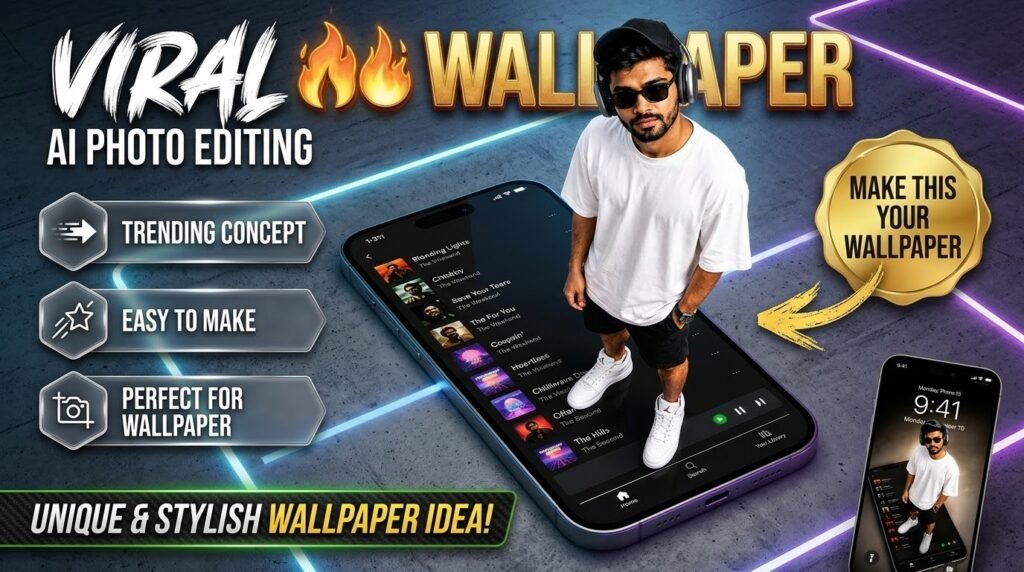

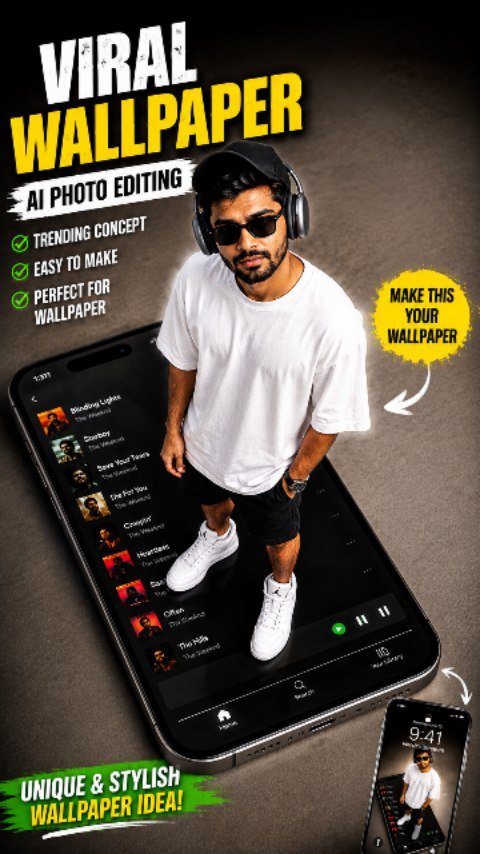
🔥 Viral AI Wallpaper Photo Editing 2026 | Create Your Own Stylish 3D Wallpaper! 📱✨
Kya aap bhi apni normal photo ko ek unique, stylish aur professional AI wallpaper mein convert karna chahte hain? 😍 Ab aap ChatGPT ki help se apni photo ko ek amazing smartphone wallpaper concept mein badal sakte hain. Is trending editing style mein aap apni photo ko ek giant mobile screen par khade hue dikha sakte hain, jisse image ko ek creative 3D look milta hai. 🔥🖤
🤖 ChatGPT Se AI Image Kaise Banayein?
1️⃣ Sabse pehle ChatGPT open karein.
2️⃣ Apni clear photo upload karein.
3️⃣ Apna AI photo editing prompt copy karke ChatGPT mein paste karein.
4️⃣ Prompt mein likhein ki aapko smartphone screen par khade hue apni realistic photo wala wallpaper chahiye.
5️⃣ Image generate karne ke liye kahen aur apni pasand ka result taiyar karein. 📸✨
💡 Short Prompt Example:
“Use my uploaded photo as the identity reference. Create a realistic 3D-style wallpaper showing me standing on a giant smartphone screen displaying a music player interface. Keep my face natural and recognizable, wearing an oversized white T-shirt, black shorts, white sneakers, black sunglasses, and headphones. Add cinematic lighting, a premium dark background, realistic shadows, and professional photography quality. Vertical composition, high detail, no cartoon or CGI look.”
🚀 Pro Tip: Achhe result ke liye clear photo upload karein aur prompt mein apni outfit, background, pose aur lighting ka detail zaroor dein. Agar pehli image perfect na aaye, toh ChatGPT ko batayein ki kya change karna hai.
❤️ Agar aapko yeh AI wallpaper editing idea pasand aaye, toh post ko save karein aur apne doston ke saath share karein. Aise hi naye AI photo editing concepts aur creative tutorials ke liye jude rahein!
Tutorial by: Your Favorite Editor 🔥
PROMPT USE ⬇️⬇️⬇️ CLICK COPY ✨✨
Use my uploaded image as the face reference. Create an ultra-realistic iPhone-style photo that keeps my face, hairstyle, and facial features identical to the reference image. I am standing confidently on top of a giant iPhone 16 Pro lying flat on a clean minimalist floor. The iPhone sc displays a modern Spotify playlist with a sleek dark inter camera angle is high above me dramatic top-down perspective, making the phone appear enormous while I remain perfectly proportioned. I am w Apple AirPods Max (Space Gray), ing a black baseball cap, black rectangular sunglasses, an oversized white t-shirt, black shorts, white Air Jordan sneakers, and a luxury watch. Relaxed confident pose with one hand in my pocket and the other by my side, looking directly up at the camera. Minimalist premium aesthetic, soft studio light realistic shadows,Apple keynote style, clean composition, photorealistic skin texture, ultra-detailed clothing, realistic reflections on the phone, crisp focus, luxury lifestyle, modern editorial photography, 35mm lens, high dynamic range, natural colors, extremely realistic, 8K quality, no text, no watermark, no extra people.
Apni image ko customize kaise karein? Prompt mein “Scene” ke baad apni pasand ka background add karein, jaise motorcycle, beach, mountains, royal throne ya urban street. “Pose” aur “Outfit” ki details bhi apne idea ke mutabiq change kar sakte hain.
🎬 AI Prompt Generator Se Text-to-Video Aur Photo-to-Video
🛠️ Tools Jo Aapko Chahiye
ULTIMATE AI VIDEO TOOLKIT • 2026
| Tool | Kaam | Status |
|---|---|---|
| Google Flow | AI Video Generation | BEST |
| Google Gemini | Smart Prompt Writing | ESSENTIAL |
| ChatGPT | Image Ideas & Prompts | ESSENTIAL |
| CapCut | Professional Video Editing | ESSENTIAL |
| VN Editor | Mobile Video Editing | USEFUL |
| Midjourney | Car Concept Images | OPTIONAL |
| Leonardo AI | Futuristic Car Designs | OPTIONAL |
Start with Google Flow, ChatGPT and CapCut to create your AI video.
CREATE YOUR VISION • EDIT LIKE A PRO
AI tools ki madad se kuch supported platforms par text-to-video aur photo-to-video content bhi banaya ja sakta hai.
- Text-to-Video: Apne scene ko words mein describe karein aur supported AI video tool mein video generate karein.
- Photo-to-Video: Ek still photo upload karke supported tool se movement ya animation create karein.
- Image-to-Video: Image ko starting frame ya visual reference ke taur par use karein.
- AI Avatar: Kuch tools talking-avatar ya presenter-style videos banane ki suvidha dete hain.
Har tool ki capabilities, free limits aur export options alag ho sakte hain. Kisi bhi service ko use karne se pehle uski current terms aur available features check karein.
💡 Best AI Images Banane Ke 7 Useful Tips
- Clear reference photo use karein: Blurry ya bahut dark photo se identity preserve karna mushkil ho sakta hai.
- Prompt mein details likhein: Background, outfit, pose, lighting aur camera angle clearly describe karein.
- Ek waqt mein limited changes karein: Agar sirf background badalna hai, to clearly likhein ki baaki image unchanged rahe.
- Aspect ratio mention karein: Instagram portrait ke liye 4:5 aur Reels ya Stories ke liye 9:16 jaise ratios use karein.
- Realistic results maangein: Natural skin texture, realistic shadows aur accurate proportions ka zikr karein.
- Text ko check karein: AI-generated images mein spelling ya small text galat ho sakta hai. Zarurat ho to text ko baad mein edit karein.
- Privacy ka dhyan rakhein: Apni ya kisi aur ki photo upload karte waqt permission aur privacy ka khayal rakhein.
❓ Frequently Asked Questions (FAQ)
Q1. Kya ChatGPT mein apni photo upload kar sakte hain?
Haan, supported ChatGPT interfaces mein aap image upload karke uske baare mein sawal kar sakte hain ya image editing aur generation ke liye instructions de sakte hain.
Q2. Kya ChatGPT free mein AI image bana sakta hai?
Availability aur usage limits account, plan aur current product features par depend karti hain. Free access mein limits ho sakti hain.
Q3. Kya apna face same rakhkar AI image bana sakte hain?
Aap apni photo ko reference ke taur par use karke facial identity preserve karne ki instruction de sakte hain. Lekin har generation mein exact identity match hone ki guarantee nahi hoti.
Q4. Instagram ke liye kaunsa image ratio use karein?
Portrait feed post ke liye 4:5 aur full-screen Reels ya Stories ke liye 9:16 aam options hain.
Q5. Achha AI image prompt kaise likhein?
Apne subject, scene, pose, outfit, lighting, camera framing, style aur aspect ratio ko clearly describe karein. Saath hi batayein ki reference photo mein kya preserve karna hai aur kya change karna hai.
🎯 Conclusion
ChatGPT ki madad se AI image creation seekhna beginners ke liye bhi aasaan ho sakta hai. Ek clear reference photo, detailed prompt aur step-by-step corrections ke saath aap apne creative ideas ko realistic portraits, fashion edits, cinematic scenes aur social media visuals mein badal sakte hain.
Agar aap AI photo editing, ChatGPT prompts, image generation, text-to-video aur naye AI tools ke tutorials seekhna chahte hain, to is guide ko save karein aur apne friends ke saath share karein.
👍 Like | 🔁 Share | 📌 Save | 💬 Comment
Comment mein batayein: Aap sabse pehle kaunsi AI image banana chahenge — Royal King, Motorcycle Portrait, Cinematic Fashion, ya Beach Photography?
🔎 SEO Keywords
ChatGPT AI Image Generator, ChatGPT Photo Editing Tutorial Hindi, AI Photo Kaise Banaye, ChatGPT Mein Photo Upload Kaise Kare, Best AI Image Prompt 2026, Free AI Photo Generator, AI Prompt Generator, Realistic AI Portrait, ChatGPT Image Generation Tutorial, Text to Video AI, Photo to Video AI, Instagram AI Photo Editing.
#️⃣ Hashtags
#ChatGPT #AIImageGenerator #AIPrompt #AIPhotoEditing #ChatGPTTutorial #AIImagePrompt #ArtificialIntelligence #PhotoEditing #TextToImage #TextToVideo #PhotoToVideo #AIPrompts #CinematicPhotography #InstagramEditing #AITutorialding