
💎 White Gold Elite DP – 1 Click Premium Stylish Couple Profile Picture ❤️✨
Welcome to the world of luxury, elegance, and royal style! 👑 Presenting the stunning White Gold Elite DP, a premium couple profile picture design that combines classy fashion, white and gold aesthetics, and a touch of elite royalty. 🤍💛
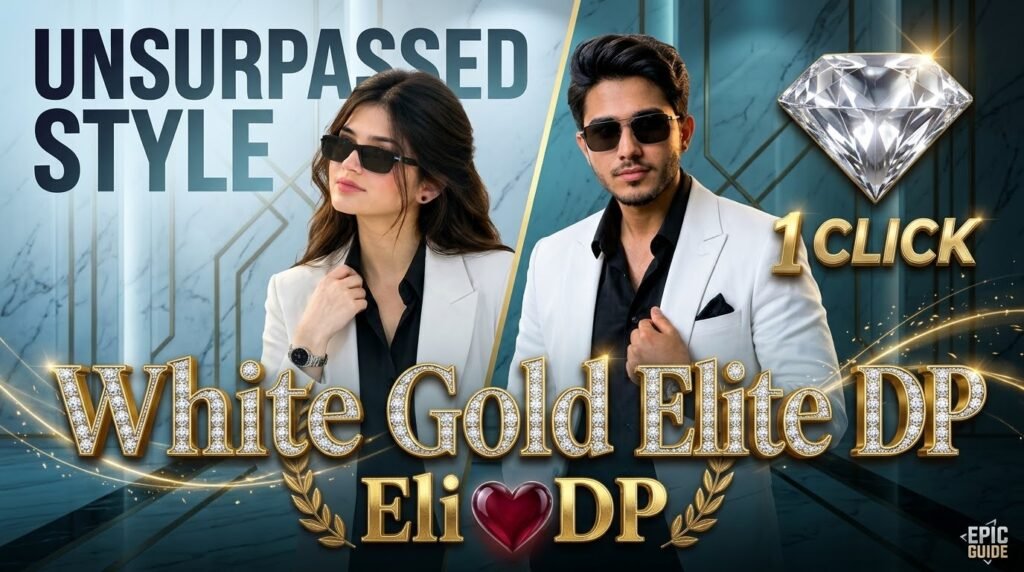
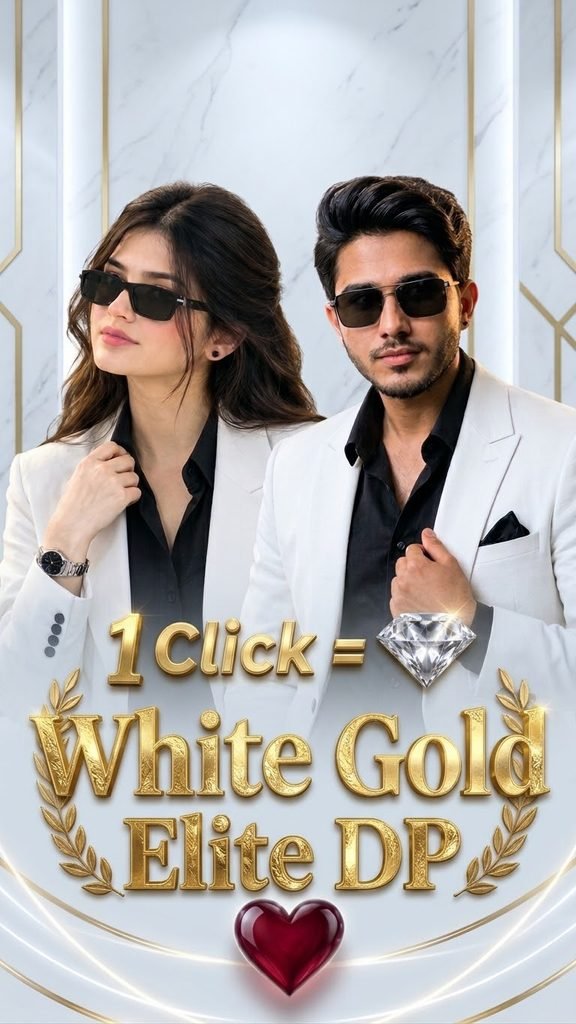
This beautiful DP features a stylish couple dressed in elegant white blazers and black shirts, paired with fashionable sunglasses for a bold, confident, and modern look. The luxurious marble background, golden decorative elements, sparkling diamond, and glowing red heart create a perfect combination of sophistication and romance. 💎❤️
✨ Why You’ll Love This DP:
💛 Premium white and gold luxury theme
🕶️ Stylish couple fashion with a classy VIP look
💎 Sparkling diamond effect for an elite touch
❤️ Beautiful heart design symbolizing love and connection
👑 Royal golden typography with elegant decorative details
📱 Perfect for WhatsApp, Facebook, Instagram, TikTok, and other social media profile pictures
🔥 Eye-catching design for anyone who loves premium and stylish DPs
Whether you want a royal couple look, a luxury profile picture, or a stylish DP that stands out from the crowd, White Gold Elite DP is the perfect choice. Its elegant color combination and premium design make it look modern, classy, and unforgettable. ✨
💖 One Click, One Stylish Look, Unlimited Elegance! 💎
Make your profile shine with the beauty of white, the richness of gold, and the charm of a heartwarming design. 🤍💛❤️
👍 Like the design
💬 Comment your favorite part
🔔 Follow for more stylish, royal, and premium DP designs!
#WhiteGoldEliteDP #CoupleDP #StylishDP #PremiumDP #RoyalDP #VIPProfilePicture #LuxuryDP #WhiteGoldTheme #CoupleProfilePicture #WhatsAppDP #1ClickDP #DiamondDP #LoveDP #EliteStyle #TrendingDP
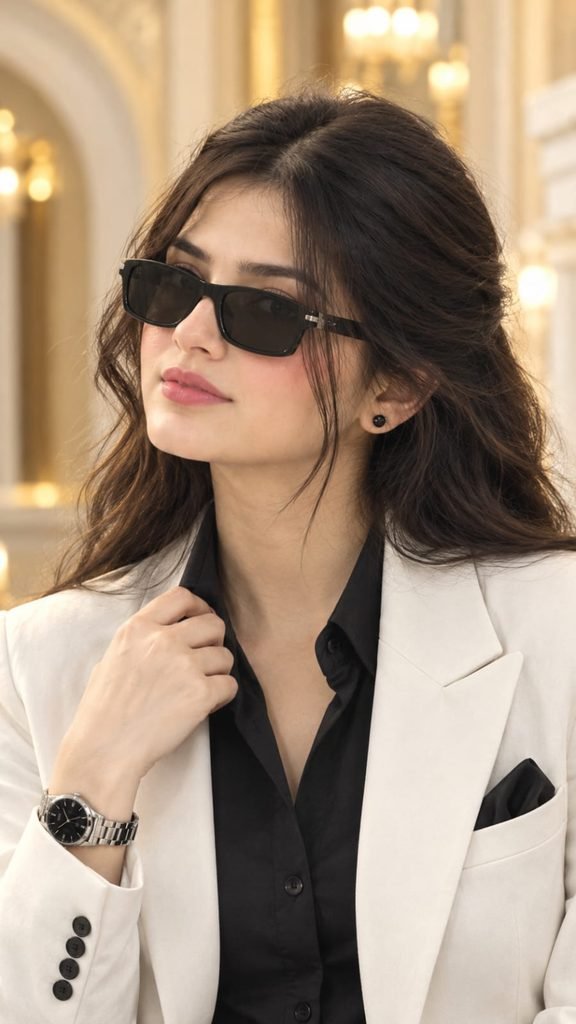
PROMPT USE ⬇️⬇️⬇️ CLICK COPY ✨✨
ULTRA-REALISTIC LUXURY FEMALE PORTRAIT — SAME FACE, SAME BACKGROUND, SAME SIZE Use the uploaded reference image as the ONLY and ABSOLUTE reference for the overall composition, background, lighting, camera angle, framing, and image proportions. Transform the male portrait into an elegant, ultra-realistic female luxury fashion portrait while preserving the reference's original visual arrangement as closely as possible. 1. FACE & IDENTITY — NATURAL FEMALE APPEARANCE Create a beautiful, realistic adult woman with natural feminine facial features, authentic skin texture, realistic facial proportions, expressive eyes, naturally shaped eyebrows, a well-defined nose, natural lips, and subtle, realistic makeup. Give her thick, dark, wavy hair swept back elegantly, with natural hair strands and a realistic hairline. Avoid an artificial AI face, excessive beautification, plastic skin, or exaggerated facial features. 2. SUNGLASSES & ACCESSORIES Keep the same rectangular black sunglasses with dark lenses, matching the original frame shape, size, position, and angle. Preserve the small black stud earring in the visible ear. Keep the silver metal wristwatch with a black round dial on the raised wrist. 3. OUTFIT — LUXURY WOMEN'S FASHION Replace the men's outfit with a premium, tailored white/ivory women's blazer over a fitted black button-up blouse with a slightly open collar. Preserve the sophisticated black-and-white color combination, elegant blazer lapels, structured shoulders, realistic fabric texture, front button, sleeve buttons, and a black pocket square. The outfit should look refined, classy, modest, and professionally styled. 4. POSE & BODY POSITION — SAME COMPOSITION Create the same vertical medium close-up portrait. The woman faces slightly toward the left side of the image, with her head turned gently to the side and her chin naturally positioned. Her expression is calm, confident, serious, and elegant. Her right hand is raised to her upper chest, gently holding the collar area of her black blouse. Match the original finger placement, wrist angle, arm position, shoulder posture, and body orientation as closely as possible. 5. BACKGROUND — EXACT SAME LUXURY INTERIOR Recreate the same elegant luxury interior with a softly blurred cream-white and warm golden background. Preserve the large architectural arch on the left, ivory walls, vertical golden decorative elements, warm golden lights in the upper background, and bright cream-colored architectural details on the right. Maintain the same background arrangement, perspective, depth of field, and soft bokeh. Do not add furniture, people, decorations, text, logos, or extra objects. 6. LIGHTING & PHOTOGRAPHY Professional luxury women's fashion photography, natural realistic skin texture, detailed hair strands, sharp focus on the face and sunglasses, soft warm golden lighting, gentle highlights on the ivory blazer, realistic shadows, creamy background blur, premium DSLR portrait quality, natural color grading, high dynamic range, crisp fabric details, and authentic photographic realism. 7. IMAGE SIZE & COMPOSITION — DO NOT CHANGE Maintain the original portrait orientation and aspect ratio of the reference image: 720 × 1284 pixels, approximately 9:16 vertical format. Preserve the same framing, subject scale, head placement, shoulder width, visible torso, hand position, and space around the subject. Do not zoom in, zoom out, crop, extend the background, rotate, or change the camera angle. 8. REALISM REQUIREMENTS 100% realistic photographic appearance. Natural human skin texture, realistic hair strands, authentic clothing fabric, physically realistic lighting, and accurate anatomy. No 3D, no CGI, no illustration, no cartoon, no painting, no artificial-looking face, no excessive retouching, no distorted hands, no extra fingers, and no unnecessary changes. FINAL INSTRUCTION: Create an elegant adult female version of the reference portrait. Keep the original cream-and-gold luxury interior, architectural arch, lighting, sunglasses, black stud earring, wristwatch, hand gesture, camera angle, framing, and original image proportions consistent with the reference. Change only the subject's gender presentation and clothing to a sophisticated women's fashion style. Keep everything else as close to the original photograph as possible.
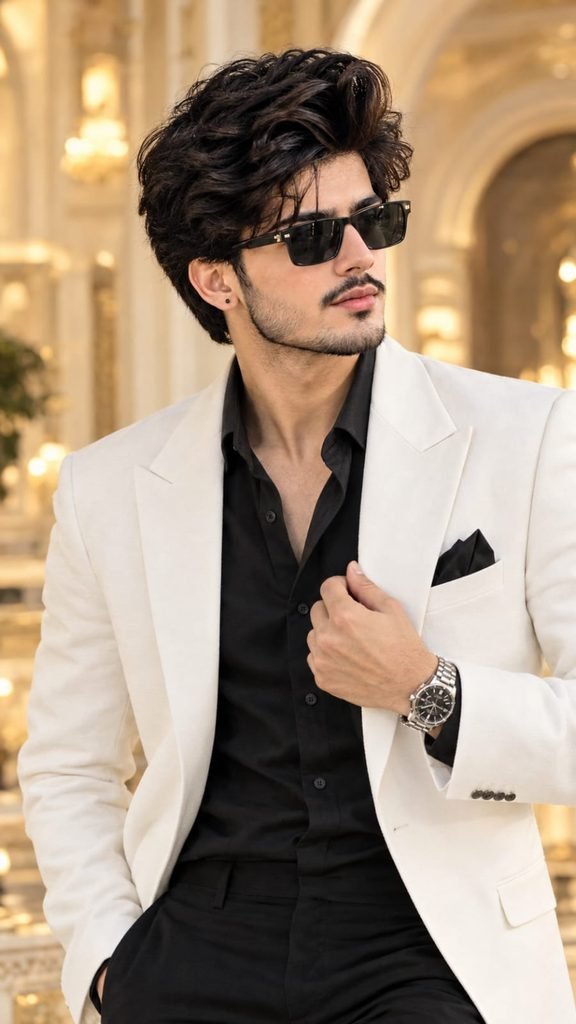
PROMPT USE ⬇️⬇️⬇️ CLICK COPY ✨✨
ULTRA-REALISTIC LUXURY PORTRAIT — EXACT SAME FACE, SAME BACKGROUND, SAME SIZE Use the uploaded reference image as the ONLY and ABSOLUTE reference for the entire image. Recreate the photograph as closely as possible, preserving the same person's facial identity, composition, pose, outfit, background, lighting, camera angle, and original aspect ratio. 1. FACE & IDENTITY — STRICTLY PRESERVE Keep the exact same face as the uploaded reference photo. Preserve the original facial structure, forehead, eyebrows, eyes, nose, lips, ears, jawline, cheekbones, natural skin tone, facial proportions, thick dark eyebrows, full dark beard, connected moustache, natural skin texture, and hairstyle. Keep the same thick, wavy, swept-back black hair, hairline, and natural facial expression. No face replacement, no generic AI face, no beautification, no facial redesign, and no artificial skin. 2. SUNGLASSES & ACCESSORIES Keep the same rectangular black sunglasses with dark lenses, identical frame shape, size, position, and angle. Preserve the small black stud earring in the visible ear and the silver metal wristwatch with a black round dial on the raised wrist. 3. OUTFIT — EXACT SAME CLOTHING The man is wearing a premium white/ivory tailored blazer over a black button-up shirt with an open collar. Preserve the same blazer lapels, shoulder fit, fabric texture, front button, sleeve buttons, black shirt, black pocket square, and all original clothing details. Do not change the outfit, colors, or styling. 4. POSE & BODY POSITION — EXACT MATCH Create the same vertical medium close-up portrait. The man faces slightly toward the left side of the image, with his head turned slightly to the side and his chin naturally positioned. His expression is calm, confident, serious, and stylish. His right hand is raised to his upper chest, gently holding the collar area of his black shirt. Keep the same finger placement, wrist angle, arm position, shoulder posture, and body orientation. Do not change the pose or crop. 5. BACKGROUND — EXACT SAME LOCATION AND DETAILS Recreate the same elegant luxury interior with a softly blurred cream-white and warm golden background. Preserve the large architectural arch on the left, the ivory walls, the vertical golden decorative elements, the warm golden lights in the upper background, and the bright cream-colored architectural details on the right. Maintain the same background arrangement, perspective, depth of field, and soft bokeh. Do not add furniture, people, decorations, text, logos, or any extra objects. 6. LIGHTING & PHOTOGRAPHY Professional luxury fashion photography, natural realistic skin texture, fine beard details, sharp focus on the face and sunglasses, soft warm golden lighting, gentle highlights on the white blazer, realistic shadows, creamy background blur, premium DSLR portrait quality, natural color grading, high dynamic range, crisp fabric details, authentic photographic appearance. 7. IMAGE SIZE & COMPOSITION — DO NOT CHANGE Maintain the exact original portrait orientation and aspect ratio of the uploaded reference image: 720 × 1284 pixels, approximately 9:16 vertical format. Preserve the same framing, subject scale, head placement, shoulder width, visible torso, hand position, and space around the subject. Do not zoom in, zoom out, crop, extend the background, rotate, or change the camera angle. 8. REALISM REQUIREMENTS 100% realistic photographic appearance. Real human skin texture, realistic hair strands, natural beard, authentic fabric, physically realistic lighting, and accurate proportions. No 3D, no CGI, no illustration, no cartoon, no painting, no artificial face, no excessive retouching, no extra fingers, no distorted hands, and no unnecessary changes. FINAL INSTRUCTION: Reproduce the uploaded reference as closely as possible. The face, hairstyle, sunglasses, beard, expression, white blazer, black shirt, wristwatch, hand gesture, elegant cream-and-gold background, lighting, framing, and original image proportions must remain consistent with the reference. Change nothing unnecessarily.
Apni image ko customize kaise karein? Prompt mein “Scene” ke baad apni pasand ka background add karein, jaise motorcycle, beach, mountains, royal throne ya urban street. “Pose” aur “Outfit” ki details bhi apne idea ke mutabiq change kar sakte hain.
🎬 AI Prompt Generator Se Text-to-Video Aur Photo-to-Video
🛠️ Tools Jo Aapko Chahiye
ULTIMATE AI VIDEO TOOLKIT • 2026
| Tool | Kaam | Status |
|---|---|---|
| Google Flow | AI Video Generation | BEST |
| Google Gemini | Smart Prompt Writing | ESSENTIAL |
| ChatGPT | Image Ideas & Prompts | ESSENTIAL |
| CapCut | Professional Video Editing | ESSENTIAL |
| VN Editor | Mobile Video Editing | USEFUL |
| Midjourney | Car Concept Images | OPTIONAL |
| Leonardo AI | Futuristic Car Designs | OPTIONAL |
Start with Google Flow, ChatGPT and CapCut to create your AI video.
CREATE YOUR VISION • EDIT LIKE A PRO
AI tools ki madad se kuch supported platforms par text-to-video aur photo-to-video content bhi banaya ja sakta hai.
- Text-to-Video: Apne scene ko words mein describe karein aur supported AI video tool mein video generate karein.
- Photo-to-Video: Ek still photo upload karke supported tool se movement ya animation create karein.
- Image-to-Video: Image ko starting frame ya visual reference ke taur par use karein.
- AI Avatar: Kuch tools talking-avatar ya presenter-style videos banane ki suvidha dete hain.
Har tool ki capabilities, free limits aur export options alag ho sakte hain. Kisi bhi service ko use karne se pehle uski current terms aur available features check karein.
💡 Best AI Images Banane Ke 7 Useful Tips
- Clear reference photo use karein: Blurry ya bahut dark photo se identity preserve karna mushkil ho sakta hai.
- Prompt mein details likhein: Background, outfit, pose, lighting aur camera angle clearly describe karein.
- Ek waqt mein limited changes karein: Agar sirf background badalna hai, to clearly likhein ki baaki image unchanged rahe.
- Aspect ratio mention karein: Instagram portrait ke liye 4:5 aur Reels ya Stories ke liye 9:16 jaise ratios use karein.
- Realistic results maangein: Natural skin texture, realistic shadows aur accurate proportions ka zikr karein.
- Text ko check karein: AI-generated images mein spelling ya small text galat ho sakta hai. Zarurat ho to text ko baad mein edit karein.
- Privacy ka dhyan rakhein: Apni ya kisi aur ki photo upload karte waqt permission aur privacy ka khayal rakhein.
❓ Frequently Asked Questions (FAQ)
Q1. Kya ChatGPT mein apni photo upload kar sakte hain?
Haan, supported ChatGPT interfaces mein aap image upload karke uske baare mein sawal kar sakte hain ya image editing aur generation ke liye instructions de sakte hain.
Q2. Kya ChatGPT free mein AI image bana sakta hai?
Availability aur usage limits account, plan aur current product features par depend karti hain. Free access mein limits ho sakti hain.
Q3. Kya apna face same rakhkar AI image bana sakte hain?
Aap apni photo ko reference ke taur par use karke facial identity preserve karne ki instruction de sakte hain. Lekin har generation mein exact identity match hone ki guarantee nahi hoti.
Q4. Instagram ke liye kaunsa image ratio use karein?
Portrait feed post ke liye 4:5 aur full-screen Reels ya Stories ke liye 9:16 aam options hain.
Q5. Achha AI image prompt kaise likhein?
Apne subject, scene, pose, outfit, lighting, camera framing, style aur aspect ratio ko clearly describe karein. Saath hi batayein ki reference photo mein kya preserve karna hai aur kya change karna hai.
🎯 Conclusion
ChatGPT ki madad se AI image creation seekhna beginners ke liye bhi aasaan ho sakta hai. Ek clear reference photo, detailed prompt aur step-by-step corrections ke saath aap apne creative ideas ko realistic portraits, fashion edits, cinematic scenes aur social media visuals mein badal sakte hain.
Agar aap AI photo editing, ChatGPT prompts, image generation, text-to-video aur naye AI tools ke tutorials seekhna chahte hain, to is guide ko save karein aur apne friends ke saath share karein.
👍 Like | 🔁 Share | 📌 Save | 💬 Comment
Comment mein batayein: Aap sabse pehle kaunsi AI image banana chahenge — Royal King, Motorcycle Portrait, Cinematic Fashion, ya Beach Photography?
🔎 SEO Keywords
ChatGPT AI Image Generator, ChatGPT Photo Editing Tutorial Hindi, AI Photo Kaise Banaye, ChatGPT Mein Photo Upload Kaise Kare, Best AI Image Prompt 2026, Free AI Photo Generator, AI Prompt Generator, Realistic AI Portrait, ChatGPT Image Generation Tutorial, Text to Video AI, Photo to Video AI, Instagram AI Photo Editing.
#️⃣ Hashtags
#ChatGPT #AIImageGenerator #AIPrompt #AIPhotoEditing #ChatGPTTutorial #AIImagePrompt #ArtificialIntelligence #PhotoEditing #TextToImage #TextToVideo #PhotoToVideo #AIPrompts #CinematicPhotography #InstagramEditing #AITutorialding